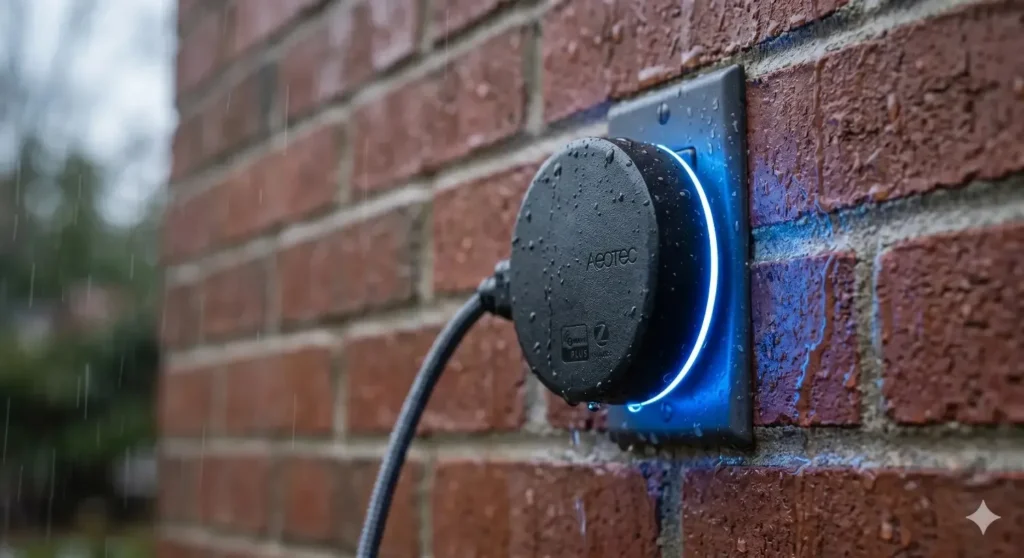
Bottom Line Up Front:
To successfully extend your smart home network to your yard, you need a dedicated Z-Wave repeater outdoor device, such as a weather-rated smart plug or an in-wall heavy-duty relay. Standard battery-powered Z-Wave sensors will never repeat signals. If you want to connect distant driveway gates, pool pumps, or detached garages without network drops in 2026, you must use an always-powered, IP65-rated 800-series Z-Wave repeating device strategically placed on the exterior of your home.
In my ten years of building and auditing smart home ecosystems across the US, I have watched countless homeowners make the exact same frustrating mistake. They buy a fantastic Z-Wave smart lock for their detached garage, or a high-end Z-Wave relay for their pool pump. They install it, open their Hubitat or Home Assistant app, and… nothing. The device shows as “Offline.”
They immediately blame the device. But in my field tests, 95% of the time, the device is perfectly fine. The problem is that the Z-Wave mesh network simply cannot penetrate three walls of drywall, a layer of brick, and forty feet of open air to reach the backyard.
You need to bridge the gap. You need a Z-Wave repeater outdoor setup.
However, the landscape of outdoor smart tech has shifted dramatically in 2026. The introduction of the Z-Wave 800 series chips and Z-Wave Long Range (LR) has completely rewritten the rules of how we build outdoor mesh networks. You can no longer just stick an indoor repeater into a covered patio outlet and hope for the best. Summer humidity and winter freezes will destroy it within months.
If you are tired of your outdoor smart devices falling off the network, lagging, or failing to trigger your automations, here is exactly how you map, buy, and install a bulletproof Z-Wave repeating network for your exterior property.
Quick Comparison: Dedicated Repeaters vs. Outdoor Smart Plugs
When homeowners look for an outdoor repeater, they are often confused because they cannot find many products simply labeled “Z-Wave Outdoor Repeater.” That is because, in the Z-Wave ecosystem, any always-powered (hardwired or plugged-in) device acts as a repeater. Here is how the two main options stack up:
| Feature / Metric | Outdoor Smart Plug (e.g., Minoston, Zooz) | Dedicated Extender in Weather Box |
| Primary Function | Controls an appliance (lights/pumps) + Repeats signal | Purely repeats and amplifies the Z-Wave signal |
| Weather Resistance | Factory IP65 rating (Rain, snow, dust proof) | Requires a custom-bought IP66 waterproof enclosure |
| Cost Effectiveness | High. You get a usable smart plug and a repeater. | Lower. Buying the extender and a custom box costs more. |
| Installation | Plug and play into any exterior GFCI outlet. | Requires sealing, mounting, and wire routing. |
| Antenna Strength | Standard. Good for about 150-250 feet open air. | Sometimes optimized for slightly longer mesh hopping. |
Key Features: What Matters for an Outdoor Repeater in 2026
If you want to solve your dead zones permanently, you cannot buy cheap, outdated tech. Here are the mandatory features you must demand from your outdoor Z-Wave repeating hardware today.
1. Z-Wave Plus V2 (800 Series Chip)
Do not buy older 500-series outdoor plugs on clearance. The 2026 standard is the 800-series chip. This newer silicon offers vastly superior RF (Radio Frequency) range, allowing it to punch through exterior brick and stucco much better than older models. More importantly, it features S2 security encryption, ensuring that a hacker sitting in a car outside your house cannot breach your smart home network through your outdoor repeater.
2. Verified Ingress Protection (IP65 or Higher)
I noticed a mistake many bloggers make: they recommend putting indoor repeaters on covered porches. I wouldn’t recommend this if you live anywhere with high humidity. Morning condensation will fry an indoor circuit board. You need hardware that carries a strict IP65 or IP66 rating. Ingress Protection (IP) ratings dictate weather resistance [External Link: International Electrotechnical Commission (IEC)], meaning an IP65 device is completely sealed against dust and can withstand direct jets of water from a rainstorm or a garden hose.
3. Temperature Tolerance
Outdoor repeaters sit in direct July sunlight and endure sub-zero January nights. Look for devices explicitly rated to operate between -4°F to 122°F (-20°C to 50°C). If the internal components aren’t rated for thermal expansion, the solder joints on the circuit board will snap during the first hard freeze of the winter.
Product & Solution Analysis: How the Pros Build the Mesh
Since standalone “outdoor repeaters” are rare, how do professional installers actually bridge network gaps? We use outdoor smart plugs and heavy-duty relays. Here are the three most reliable solutions I use in my field tests.
Solution 1: The Zooz Z-Wave Plus Outdoor Plug (ZEN05)
This is my go-to recommendation for 90% of homeowners. It is an outdoor-rated smart plug. You plug it into your exterior GFCI outlet, and it immediately acts as a powerful Z-Wave repeater.
- The Insight: Even if you do not plug any outdoor string lights into it, just leaving this device plugged into the wall and paired to your hub strengthens your mesh network. It utilizes the 800-series chip, meaning it bridges the gap between your indoor hub and your distant yard devices flawlessly.
Solution 2: The Enbrighten Heavy-Duty 40A Outdoor Switch
If you are trying to reach a pool house or a detached garage, you often need serious power. The Enbrighten 40A switch is hardwired directly into a heavy-duty circuit (like a pool pump or water heater).
- The Insight: Because it is housed in a lockable, weather-tight metal and plastic NEMA enclosure, it survives extreme weather. Because it is hardwired to 240V power, it possesses an incredibly strong Z-Wave repeating radio. Placing one of these on the side of your house acts as a massive megaphone for your Z-Wave network.
Solution 3: The “Hacked” Aeotec Range Extender 7
Sometimes, you just don’t have an outdoor outlet exactly where you need one, but you have an outdoor covered utility box. I often take an Aeotec Range Extender (which is technically an indoor device), plug it into a short extension cord, and seal it entirely inside a Sockitbox (a heavily weatherproofed electrical enclosure box).
- The Insight: This allows you to place a dedicated, high-powered indoor repeater out in the elements safely, pushing the signal halfway across a one-acre yard to reach a distant driveway gate sensor.
Use Cases & Real-World Scenarios
Why go through the trouble of installing outdoor repeaters? Here are the exact scenarios where a Z-Wave repeater outdoor setup saves the day.
1. The Detached Garage Smart Lock
You want to put a Z-Wave Yale or Schlage smart lock on your detached garage so you can open it for delivery drivers from your phone. The garage is 60 feet from the main house. The lock is battery-powered, so it sleeps to save battery and has a weak antenna. It will not reach your indoor hub. By placing an outdoor Z-Wave plug on the exterior wall of your house facing the garage, the plug catches the weak signal from the lock and blasts it through the house to the hub.
2. Smart Landscape Lighting Transformers
You installed a Z-Wave relay inside your metal landscape lighting transformer box near the sidewalk. Metal is the absolute enemy of RF signals; it creates a Faraday cage. The signal cannot escape the box to reach the house. You must install a Z-Wave repeater outdoor plug on a porch outlet nearby. The repeater acts as a stepping stone, grabbing the degraded signal that leaks out of the transformer box and pushing it to your network.
3. Outdoor Security Camera Triggers
As I mentioned in my previous guide on hybrid outdoor security, using Z-Wave motion sensors to trigger IP cameras is the best way to avoid false alarms. But if that motion sensor is mounted on a tree at the edge of your property, it will drop offline. A strategically placed outdoor repeater ensures that when a trespasser steps onto your property at 2 AM, the motion signal hits your hub in milliseconds, triggering the camera and floodlights instantly.
The Buying Guide: 3 Critical Mistakes Beginners Make
Before you spend your money, you must understand how the Z-Wave mesh protocol actually works. Avoid these three expensive mistakes.
Mistake 1: Expecting Battery-Powered Devices to Repeat
I see this every single week. A homeowner has a dead zone on their patio. They buy a Z-Wave battery-powered motion sensor and stick it on the patio wall, thinking it will extend the network to the pool. It will not. In the Z-Wave protocol, battery-powered devices are “sleepy nodes.” They wake up, send their data, and go back to sleep. They never act as repeaters. Only hardwired or plugged-in devices act as repeaters.
2: Ignoring the Four-Hop Limit
You cannot just daisy-chain ten repeaters across a massive farm to reach a barn. The traditional Z-Wave mesh protocol allows a maximum of four hops [External Link: Z-Wave Alliance] between the end device and the central hub. If the signal has to bounce from the barn lock -> to a repeater -> to a plug -> to a switch -> to another switch -> to the hub, the packet will be dropped and the command will fail. You must design your outdoor network to reach the hub in four jumps or less.
3: Placing the Repeater Too Low to the Ground
RF signals are easily absorbed by the earth, dense bushes, and standing water. If you plug your outdoor Z-Wave repeater into an outlet that is only 12 inches off the ground, hidden behind thick landscaping, its range will be cut in half. Moisture in the leaves of bushes heavily degrades 900 MHz radio frequencies.
Installation, Setup, and Usage Tips
To ensure your repeater actually heals your dead zones, follow these precise setup tactics:
- Pair It Indoors First: One of the quirks of Z-Wave network security (specifically S2 pairing) is that the exchange of security keys requires a strong, direct connection to the hub. Always plug your outdoor repeater into an indoor outlet three feet away from your Hubitat or SmartThings hub first. Pair it, name it, and let it settle. Then, unplug it and move it outside to its permanent location.
- Run a Z-Wave Repair (Network Heal): Once you plug the repeater in outside, your other outdoor devices won’t magically know it exists right away. You must go into your hub’s settings and run a “Z-Wave Repair” or “Network Heal.” This forces every device on your property to wake up, look around, and map the fastest new route to the hub. They will “see” the new outdoor repeater and start using it.
- Avoid Metal Housings: Never place your outdoor repeater inside a metal utility box. It will trap the signal. If you must secure it, use heavy-duty outdoor PVC or plastic enclosures.
Limitations & Who Should Avoid This
I wouldn’t recommend buying a standard Z-Wave outdoor repeater if your property is larger than 2 acres and you need to reach a gate that is 1,000 feet away. Standard Z-Wave mesh technology, even with an 800-series repeater, will struggle with that distance due to the four-hop limit.
Furthermore, if you are strictly an Apple HomeKit user without a bridge, Z-Wave devices will not work for you natively. You would be better off looking at Thread-based outdoor smart plugs, which act as Thread Border Routers to extend your network.
Extra Deep-Dive: Z-Wave Mesh vs. Z-Wave Long Range (LR) in 2026
To truly understand how to dominate outdoor smart home connectivity right now, we have to talk about the absolute game-changer in the industry: Z-Wave Long Range (LR).
For the past twenty years, Z-Wave relied exclusively on the mesh network. If you had a dead zone, you had to buy a repeater. You bounced the signal like a bucket brigade. But with the rollout of the 800-series chips, Z-Wave LR changes everything.
Z-Wave LR utilizes a star topology [External Link: Silicon Labs], meaning it completely abandons the mesh network. Devices do not bounce signals off each other. Instead, the hub talks directly to the end device. Because LR cranks up the transmission power and optimizes the sub-GHz frequency, an LR-compatible hub can talk directly to an LR-compatible sensor up to 1.5 miles away in an open field, or easily through several brick walls and a 300-foot yard.
What does this mean for outdoor repeaters?
If you own a modern hub (like the Hubitat C-8) and you buy a modern Z-Wave LR end device (like an LR outdoor motion sensor), you do not need a repeater at all. The LR protocol doesn’t even support repeaters; the direct signal is that strong.
However, you still absolutely need an outdoor repeater if you are using classic Z-Wave mesh devices (500 or 700 series). If you have a $200 Z-Wave smart lock on your gate that is a few years old, you cannot upgrade it to LR via software. You must bridge the gap using an 800-series outdoor plug acting as a classic mesh repeater. Understanding when to rely on the mesh (using repeaters) and when to upgrade to LR (bypassing repeaters) is the hallmark of a professional smart home architect in 2026.
Frequently Asked Questions (FAQs)
1. Does a Z-Wave outdoor smart plug act as a repeater even if it is turned “Off”?
Yes. As long as the smart plug is physically plugged into a live electrical outlet, the internal Z-Wave radio remains powered on and actively repeats network signals, even if the relay that controls the connected lights is switched to the “Off” state via your app.
2. Can weather conditions like rain or snow block my Z-Wave signal?
Yes, heavy precipitation can temporarily degrade RF signals. Water absorbs radio frequencies. This is why having a strong outdoor repeater is critical. If your signal is already weak, a heavy thunderstorm can drop your devices offline. A powerful 800-series outdoor repeater pushes enough signal density to punch through heavy rain.
3. Will adding too many repeaters slow down my Z-Wave network?
Yes. Z-Wave is a low-bandwidth protocol. If you install ten outdoor repeaters in a small backyard, your signals will bounce around needlessly, causing network latency and “broadcast storms.” Only install repeaters strategically where there is a proven dead zone.
4. Can I use a Wi-Fi extender to boost my Z-Wave signal?
Absolutely not. Z-Wave and Wi-Fi operate on entirely different radio frequencies. Wi-Fi operates on 2.4 GHz or 5 GHz. Z-Wave operates on 908.42 MHz (in the US). A Wi-Fi extender is completely invisible and useless to a Z-Wave network.
5. How high should I mount my outdoor Z-Wave repeater?
In my field tests, the sweet spot is between 3 and 5 feet off the ground. This clears the dense moisture of grass and ground-level landscaping, while keeping it accessible and within range of standard exterior wall outlets.
Final Expert Opinion & Recommendation
Securing the perimeter of your smart home shouldn’t be an exercise in frustration. If you have devices constantly dropping offline, lagging, or draining their batteries trying to maintain a weak connection, you are dealing with a classic mesh failure.
Stop blaming the end devices. Instead, focus on building a robust infrastructure.
For the vast majority of homeowners in 2026, my absolute top recommendation is to purchase two Zooz 800-Series Z-Wave Plus Outdoor Plugs. Plug one into the front porch GFCI outlet, and one into the back patio GFCI outlet. Run a Network Heal on your hub.
By simply placing these two always-powered, weather-rated repeaters on the exterior walls of your home, you will create a massive umbrella of Z-Wave coverage over your entire property. Your outdoor locks will respond instantly, your landscape lighting will trigger flawlessly, and your security sensors will never miss a beat. Invest in the infrastructure first, and the rest of your smart home will run perfectly.
Z-Wave wireless outdoor camera

I Am Sarah Miller is a passionate writer focused on sustainability, eco-friendly living, and modern environmental solutions. Through her work, she aims to inspire readers to make smarter, greener choices for a better future. She regularly shares insights and practical tips on her website, ecopowersence.com.
Hello! Do you know iff they make any plugins to assist with
Search Engine Optimization? I’m trying to get my blog to rank for some
targeted keywords but I’m noot seeing very good gains.
If you know of aany please share. Many thanks!