Bottom Line Up Front (BLUF)
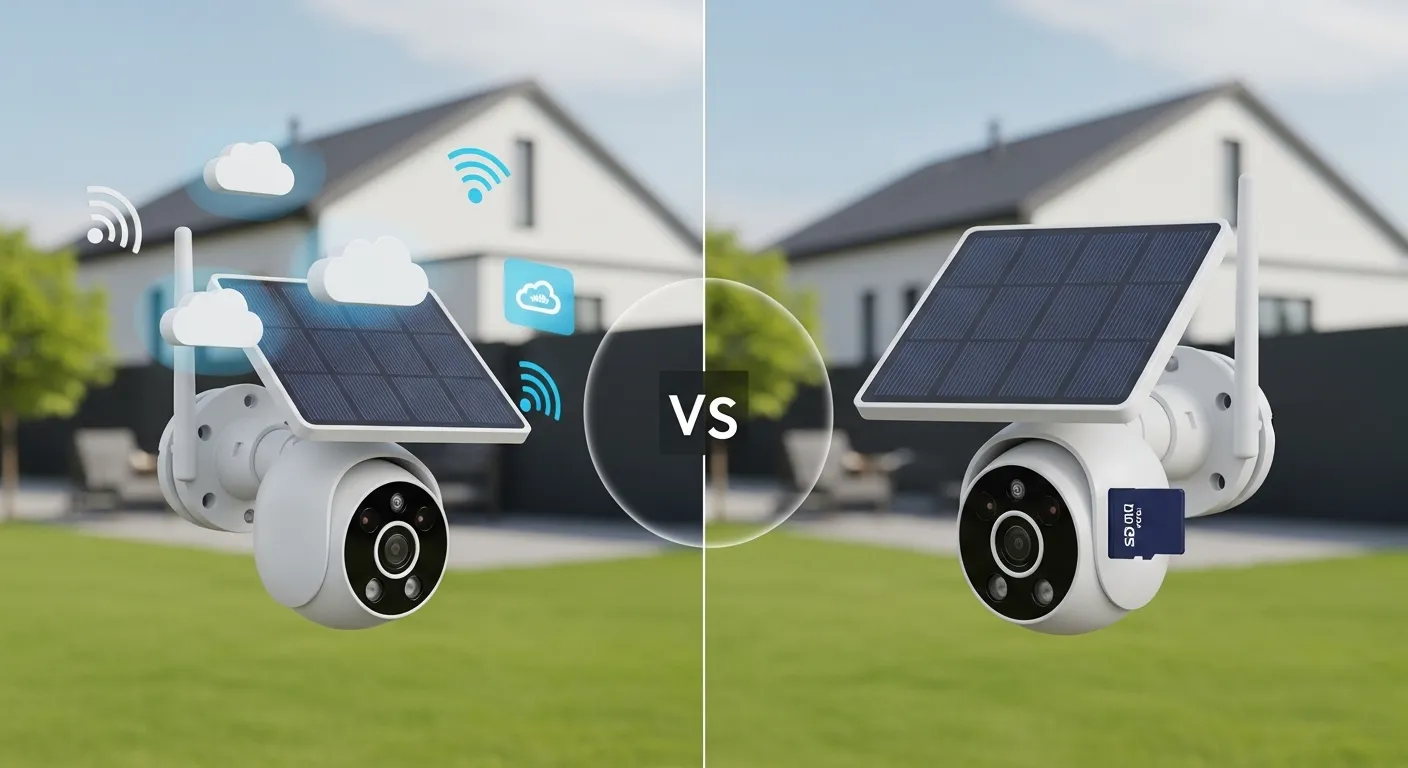
If you want maximum security and remote access, solar cameras with cloud storage are the better choice. They protect footage even if the camera is stolen and allow viewing from anywhere. However, SD card storage wins for lower long-term costs and privacy, since recordings stay local and there’s no monthly subscription.
In my experience testing solar-powered security cameras around backyard sheds and off-grid properties, the best setup is often a hybrid system/local SD card recording with optional cloud backup. That way you get affordability, reliability, and remote access when needed.
Why Storage Matters for Solar Security Cameras
Solar-powered cameras are designed for off-grid or hard-to-wire areas, backyard sheds, gates, barns, RV sites, or remote cabins. Because these cameras rely on battery power and solar charging, their storage system plays a huge role in performance.
The two dominant options are:
- Cloud Storage – footage uploads to remote servers through Wi-Fi.
- SD Card Storage – video saves locally on a microSD card inside the camera.
Both systems have advantages. The best choice depends on security priorities, budget, and internet availability.
Cloud Storage vs SD Card: Quick Comparison
| Feature | Cloud Storage | SD Card Storage |
| Footage Location | Remote servers | Inside the camera |
| Monthly Cost | Usually $3–$10 | Free after purchase |
| Theft Protection | Footage safe if camera stolen | Footage lost if camera stolen |
| Internet Requirement | Required | Optional |
| Storage Capacity | Virtually unlimited | Limited by card size |
| Privacy Control | Stored on company servers | Stored locally |
| Remote Access | Easy from anywhere | Often limited to app access |
Key takeaway: Cloud storage prioritizes security and convenience, while SD cards prioritize cost savings and privacy.
Solar Cameras With Cloud Storage
Cloud-based recording uploads video clips to secure online servers whenever motion is detected.
In real-world setups, this approach works extremely well for homes where security is the main concern.
How Cloud Storage Works
- The camera detects motion.
- Video clip uploads to the cloud through Wi-Fi.
- You receive a smartphone notification.
- Footage can be viewed anytime through the app.
Many smart home ecosystems now rely heavily on cloud storage.
Pros of Cloud Storage
1. Footage survives theft or vandalism
If someone steals or destroys the camera, the recordings remain safe in the cloud.
2. Easy remote access
You can check footage anytime even if you’re traveling.
3. Automatic backups
Clips are stored on secure servers without needing manual management.
4. Smart AI features
Many brands add advanced features like:
- AI motion detection
- Person recognition
- Package alerts
- Activity zones
These features usually rely on cloud processing.
Cons of Cloud Storage
1. Monthly subscription
Most brands charge between $3 and $10 per camera per month.
2. Internet dependency
If Wi-Fi drops, recordings may fail to upload.
3. Privacy concerns
Some users prefer not storing home footage on third-party servers.
4. Battery usage
Uploading video uses more power, which can slightly reduce battery life on solar cameras.
Real-World Experience With Cloud Cameras
When we installed solar cameras around a detached garage and shed, cloud storage proved incredibly useful.
One night, motion detection caught someone attempting to open a side gate. Because the clip uploaded instantly, we had a recorded video alert on the phone within seconds.
If that footage had been stored locally only, it could have been lost if the camera was damaged.
Solar Cameras With SD Card Storage
SD card storage keeps recordings directly inside the camera.
Many solar cameras include microSD slots supporting 64GB to 256GB cards.
How SD Card Recording Works
- Motion detection triggers recording.
- Footage saves directly to the microSD card.
- The app allows playback when connected to the camera.
Some cameras also overwrite older footage when storage fills up.
Pros of SD Card Storage
1. No monthly fees
Once you buy the SD card, storage is completely free.
2. Better privacy
Footage stays local and isn’t uploaded to company servers.
3. Works without internet
Even if Wi-Fi drops, the camera can still record.
4. Lower power consumption
Local storage uses less battery than constant cloud uploads.
Cons of SD Card Storage
1. Footage lost if camera stolen
If someone takes the camera, they take the evidence too.
2. Limited storage
Typical capacities:
| SD Card Size | Approx Recording Time |
| 64GB | 4–6 days |
| 128GB | 7–12 days |
| 256GB | 2–3 weeks |
3. Harder remote access
You may need to connect to the camera through the app or local network.
4. Risk of card failure
Low-quality SD cards can wear out over time.
Real-World Experience With SD Card Cameras
During testing on a remote cabin with weak internet, SD card recording was the only reliable option.
The camera continued capturing motion events even when Wi-Fi dropped for hours.
However, one limitation became clear: if someone stole the device, the evidence would disappear with it.
Battery and Performance Comparison
Because solar cameras rely on battery power, storage type affects energy usage.
| Feature | Cloud Storage | SD Card Storage |
| Power Usage | Higher | Lower |
| Upload Energy | Required | None |
| Battery Life | Slightly shorter | Longer |
| Solar Efficiency | Good in sunny areas | Better for low-sun locations |
In practice, solar panels usually compensate for the extra power usage from cloud uploads as long as the camera receives 2–3 hours of sunlight daily.
Hybrid Cameras: The Best of Both Worlds
Many modern solar cameras offer dual storage options.
This means they can record:
- Locally on an SD card
- Remotely in the cloud
Hybrid systems give users flexibility and redundancy.
If the internet goes down, the SD card still records.
If the camera gets stolen, the cloud footage remains safe.
In my experience, this setup delivers the most reliable security coverage.
What to Look For When Choosing a Solar Camera
Before choosing between cloud or SD storage, consider these key factors.
1. Storage Flexibility
Look for cameras supporting both cloud and microSD storage.
This avoids being locked into subscriptions.
2. Battery Capacity
Solar cameras typically range between:
| Battery Size | Typical Performance |
| 5000 mAh | Light use |
| 9000 mAh | Average home use |
| 15000 mAh+ | Heavy motion detection areas |
Larger batteries handle cloud uploads better.
3. Weather Resistance
Outdoor solar cameras should have IP65 or IP66 weather ratings.
This protects against:
- Rain
- Dust
- Snow
- Temperature changes
4. Smart App Support
A good mobile app should offer:
- Motion alerts
- Playback controls
- Storage management
- Activity zones
Poor app design can ruin the experience even with good hardware.
5. Night Vision Quality
Look for cameras with:
- Color night vision
- Infrared LEDs
- Wide dynamic range
Low-quality sensors struggle in dark backyards or sheds.
Pros & Cons Summary
Cloud Storage
Pros
- Protects footage from theft
- Easy remote viewing
- AI detection features
- Automatic backups
Cons
- Monthly subscription
- Requires internet
- Slightly higher battery usage
SD Card Storage
Pros
- No subscription cost
- Better privacy
- Works offline
- Lower power consumption
Cons
- Limited storage space
- Footage lost if camera stolen
- SD card wear over time
Final Verdict: Which Storage Type Should You Choose?
If your priority is maximum home security, choose a solar camera with cloud storage. The ability to access footage remotely and preserve evidence after theft is a major advantage.
However, if you want zero monthly fees and better privacy, an SD card-based camera is perfectly adequate especially for sheds, barns, or off-grid locations.
From years of testing smart home security gear, my strongest recommendation is simple:
Buy a solar camera that supports both SD card recording and optional cloud backup.
This hybrid approach delivers the best mix of:
- Security
- Cost control
- Reliability
- Remote access
If you’re upgrading your outdoor security system, start by choosing a dual-storage solar camera with a 10,000+ mAh battery and IP65 weather rating. That combination will provide dependable protection for most homes and properties.
Next step: Compare the latest hybrid solar security cameras and choose one that supports both microSD recording and cloud backup you’ll get the flexibility most homeowners actually need.

I Am Sarah Miller is a passionate writer focused on sustainability, eco-friendly living, and modern environmental solutions. Through her work, she aims to inspire readers to make smarter, greener choices for a better future. She regularly shares insights and practical tips on her website, ecopowersence.com.


1 thought on “Solar Cameras With Cloud Storage vs SD Card: Which Storage Option Is Better?”