Introduction: Understanding Smart Lock Technology for Modern Homes
Traditional keys have protected homes for hundreds of years, but the way people secure and access their homes is changing. Smart locks are becoming an important part of modern smart home systems because they provide more control, flexibility, and convenience compared with traditional locking methods.
A smart lock allows homeowners to unlock and manage their doors using digital methods such as smartphone apps, PIN codes, fingerprints, Bluetooth connections, and internet-based remote access. Instead of depending only on a physical key, users can decide who gets access, when they get access, and how the door is controlled.
For anyone exploring connected home technology, understanding smart lock basics is important before choosing a system. Different smart lock technologies offer different benefits, and the right choice depends on lifestyle, security needs, and the level of automation a homeowner wants.
Smart locks are only one part of a complete connected home ecosystem. If you want to explore how smart locks fit into modern indoor smart home solutions, you can also read our complete guide to smart locks
This guide explains how smart locks work, including app control, keypad systems, fingerprint recognition, Bluetooth, Wi-Fi connectivity, remote access, security features, and practical buying considerations.
What Is a Smart Lock and How Does It Work?
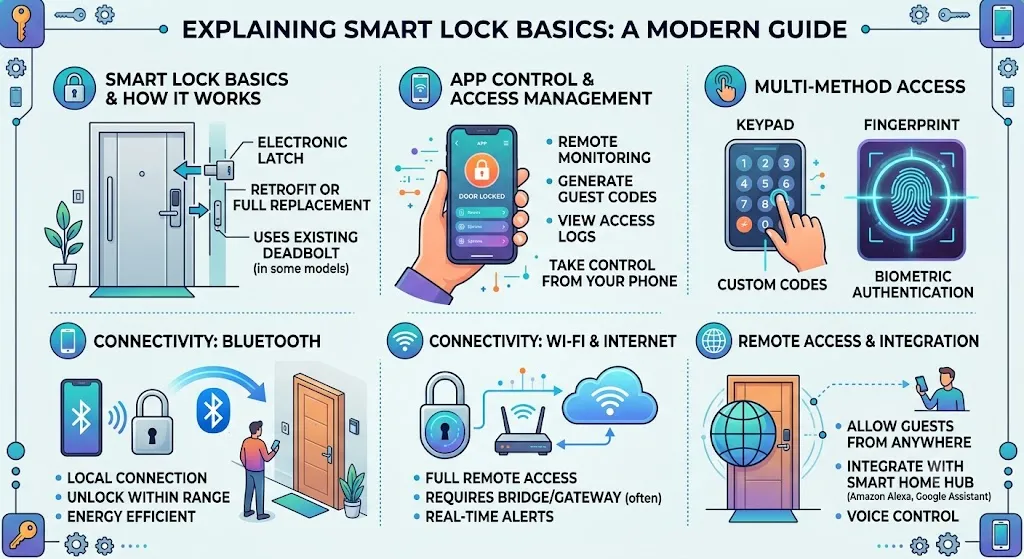
A smart lock is an electronic locking system that replaces or upgrades a traditional door lock by adding digital control features. Instead of using only a physical key, users can unlock doors through different authentication methods.
These methods may include:
- Smartphone applications
- Keypad PIN codes
- Fingerprint scanning
- Bluetooth communication
- Wi-Fi connectivity
- Smart home automation systems
The main purpose of a smart lock is to make access easier while giving homeowners better control over their security.
A traditional lock mainly answers one question:
“Does this key open the lock?”
A smart lock can answer more advanced questions:
- Who is trying to enter?
- Is this person authorized?
- When did they access the door?
- Should they have access at this specific time?
- Should the homeowner receive an alert?
How Smart Locks Work Behind the Scenes
Although smart locks look simple from the outside, several technologies work together to provide digital access.
Electronic Locking Mechanism
The main function of a smart lock is still securing the door. The difference is that an electronic motor controls the locking mechanism instead of a person manually turning a key.
When an authorized command is received, the internal motor moves the locking mechanism and allows the door to open.
The command may come from:
- A smartphone app
- A fingerprint sensor
- A keypad
- A connected smart home system
Sensors and Internal Components
Smart locks use different sensors to understand the condition of the door and the locking system.
Common components include:
Door Position Sensors
These sensors help determine whether the door is open or closed.
Lock Status Sensors
They allow the system to identify whether the lock is currently secured or unlocked.
Authentication Sensors
These verify user identity through:
- Fingerprints
- PIN codes
- Smartphones
- Digital permissions
These features help improve convenience and provide more information than traditional locks.
Wireless Communication Technology
Smart locks need communication methods to connect with users and smart home devices.
The most common technologies include:
Bluetooth
Bluetooth provides short-range communication between a smartphone and the smart lock.
Wi-Fi
Wi-Fi allows internet-based features such as remote access and notifications.
Smart Home Protocols
Some smart locks connect with smart home ecosystems to work with other connected devices.
For example, unlocking a door could trigger indoor lights or activate another smart home routine.
Battery System and Power Management
Most smart locks operate using batteries because doors usually do not have a direct electrical connection.
Battery life depends on:
- Lock usage frequency
- Wireless connection type
- Smart features being used
For example:
- Bluetooth locks generally consume less energy.
- Wi-Fi locks may use more power because they maintain internet connectivity.
Most modern smart locks provide:
- Low battery alerts
- Mobile app notifications
- Emergency power options
Regular battery checks are important because a smart lock depends on power for electronic features.
Smart Locks vs Traditional Locks: What Is the Difference?
The biggest difference between smart locks and traditional locks is how access is managed.
| Feature | Traditional Lock | Smart Lock |
|---|---|---|
| Access method | Physical key | App, fingerprint, PIN, phone, or key |
| User management | Requires extra keys | Digital permissions |
| Remote control | Not available | Available with connected models |
| Activity tracking | Usually unavailable | Available on many models |
| Guest access | Requires key sharing | Temporary digital access |
Traditional locks are simple and reliable, but they can become inconvenient when many people need access.
For example:
- Family members need separate keys.
- Guests need temporary access.
- Lost keys need replacement.
- There is no record of who entered.
Smart locks solve many of these problems by allowing digital access management.
A homeowner can create a temporary code for a visitor, remove access from an old user, or check activity history through an app.
However, smart locks also require attention to:
- Battery management
- Software updates
- Account security
- Proper installation
How Smart Lock App Control Works
One of the most popular features of smart locks is smartphone control. A mobile app allows homeowners to manage their door without carrying a physical key.
The app becomes a control center where users can:
- Lock and unlock the door
- Add or remove users
- Create access codes
- Check activity history
- Receive alerts
Connecting a Smart Lock to a Smartphone
The setup process usually includes:
Step 1: Install the Mobile App
The user downloads the manufacturer’s application and creates an account.
Step 2: Pair the Smart Lock
The smartphone connects with the lock using Bluetooth, Wi-Fi, or another supported connection.
Step 3: Configure Users
The homeowner can add family members, guests, or other approved users.
Step 4: Customize Settings
Users can adjust features such as:
- Auto-lock timing
- Notifications
- Access permissions
What You Can Do Through a Smart Lock App
Lock and Unlock From Your Phone
Instead of searching for keys, users can control their door directly from their smartphone.
This is useful when:
- Carrying groceries
- Arriving home at night
- Helping family members enter
Manage Multiple Users
Smart lock apps allow homeowners to control who has access.
Examples:
- Permanent access for family members
- Temporary access for guests
- Scheduled access for service workers
This makes smart locks especially useful for busy households.
View Access History
Some smart locks record activity logs.
These records may show:
- When the door was unlocked
- Which user accessed the lock
- Recent activity times
This provides homeowners with more awareness about their home’s security.
Receive Smart Notifications
Connected smart locks can send alerts for:
- Door unlocking
- Low battery warnings
- Failed access attempts
These notifications help users stay informed even when they are away.
Keypad Smart Locks: Access Without Physical Keys
Keypad smart locks are one of the most common types of smart locks because they provide simple keyless entry without requiring a smartphone.
Instead of using a physical key, users enter a personal identification number (PIN) on the keypad to unlock the door. This makes them a practical choice for families, rental properties, and people who want easy access management.
A keypad system allows homeowners to create different access codes for different users. For example, family members can have their own PIN, while guests can receive a temporary code that expires after a specific period.
How Keypad Entry Works
A keypad smart lock stores approved access codes inside its system. When a user enters a PIN, the lock compares the entered code with the stored information.
If the code is correct:
- The system verifies the user.
- The electronic locking mechanism activates.
- The door unlocks.
Many advanced keypad locks also connect with mobile apps, allowing homeowners to create, change, or remove access codes remotely.
Common keypad features include:
- Temporary guest codes
- Scheduled access codes
- One-time entry codes
- Failed attempt alerts
- Automatic locking
Advantages of Keypad Smart Locks
No Physical Key Required
Users do not need to carry keys, which reduces the chance of losing them.
Easy Guest Access
Homeowners can provide access without creating additional physical keys.
For example:
- A cleaner can receive a temporary code.
- Guests can enter without meeting the homeowner.
- Family members can have personal access codes.
Useful for Families
Multiple users can have separate PINs, making access easier to manage.
Limitations of Keypad Smart Locks
Although keypad locks are convenient, they have some limitations.
Code Sharing Risks
If users share their PIN carelessly, unauthorized people may gain access.
Forgotten Codes
A forgotten PIN can create problems if there is no backup access method.
Physical Wear
Frequent use may create visible patterns on keypad buttons, although many newer designs include features to reduce this issue.
Fingerprint Smart Locks and Biometric Access
Fingerprint smart locks use biometric technology to identify users through their unique fingerprint patterns.
Instead of remembering a password or carrying a key, users simply place their finger on a sensor to unlock the door.
This technology is becoming popular because fingerprints are personal and convenient.
How Fingerprint Recognition Works
Fingerprint smart locks follow a simple process:
Step 1: Fingerprint Registration
During setup, the user’s fingerprint is scanned and converted into digital information.
Step 2: Data Storage
The lock stores a fingerprint pattern that can be used for future verification.
Step 3: Identity Matching
When a person places a finger on the sensor, the system compares it with stored fingerprint data.
Step 4: Access Approval
If the fingerprint matches, the lock unlocks.
Most systems do not store a normal image of the fingerprint. Instead, they store digital patterns used for authentication.
Benefits of Fingerprint Smart Locks
Fast and Convenient Access
Users can unlock the door quickly without:
- Searching for keys
- Remembering PIN codes
- Opening a smartphone app
Personalized Security
Each approved person can have their own fingerprint profile.
This is useful for:
- Families
- Shared homes
- Small offices
Difficult to Share
Unlike a PIN code, a fingerprint cannot easily be copied or shared with another person.
Challenges of Fingerprint Smart Locks
Sensor Accuracy
Fingerprint recognition may sometimes fail because of:
- Dirty sensors
- Wet fingers
- Poor fingerprint registration
- Damaged fingerprints
Not Suitable for Everyone
Some users may experience difficulty if their fingerprints are worn or unclear.
Requires Sensor Maintenance
Cleaning the fingerprint scanner regularly helps maintain better performance.
Bluetooth Smart Locks Explained
Bluetooth is one of the most common communication technologies used in smart locks.
smart locks connect directly with a smartphone when the user is nearby. They are designed mainly for local access rather than controlling a door from a different location.
How Bluetooth Unlocking Works
The process usually works like this:
- The user approaches the door with an authorized smartphone.
- The lock detects the Bluetooth signal.
- The system verifies the connected device.
- The lock allows access.
Some Bluetooth smart locks automatically unlock when the user approaches, while others require opening a mobile app.
Because Bluetooth works over a short distance, these locks usually do not require a constant internet connection.
Advantages of Bluetooth Smart Locks
Lower Energy Consumption
Bluetooth generally uses less power compared with Wi-Fi because it does not maintain a continuous internet connection.
Works Without Internet
Users can unlock the door even if their home internet is unavailable.
Simple Setup
Bluetooth connections are often easier to install and configure.
Limitations of Bluetooth Smart Locks
Limited Range
Bluetooth works only within a short distance.
For example, a homeowner cannot usually unlock the door for someone while sitting at work.
Limited Remote Features
Remote access normally requires additional hardware, such as a Wi-Fi bridge or smart home hub.
Wi-Fi Smart Locks Explained
Wi-Fi smart locks provide more advanced connectivity by connecting to a home network.
Unlike Bluetooth locks, Wi-Fi models can communicate through the internet, allowing homeowners to control their doors even when they are far away.
How Wi-Fi Enables Smart Features
A Wi-Fi smart lock usually connects through:
- Built-in Wi-Fi
- A Wi-Fi bridge
- A smart home hub
The connection allows communication between:
- The smart lock
- The mobile app
- Cloud services
This makes features like remote unlocking and real-time alerts possible.
Benefits of Wi-Fi Smart Locks
Remote Access
Homeowners can lock or unlock their doors from almost anywhere.
Examples:
- Letting a family member inside while away.
- Managing a rental property remotely.
- Checking door status during travel.
Smart Home Integration
Many Wi-Fi smart locks can connect with other smart home devices.
For example:
- Unlocking the door can turn on indoor lights.
- Locking the door can activate a security routine.
Real-Time Notifications
Users can receive alerts about:
- Door activity
- Access attempts
- Battery status
Drawbacks of Wi-Fi Smart Locks
Higher Battery Usage
Wi-Fi requires more energy compared with Bluetooth.
Internet Dependency
Some features may stop working if the internet connection fails.
More Setup Requirements
Wi-Fi smart locks may require more configuration during installation.
Smart Lock Security and IoT Safety Considerations
Because smart locks are connected devices, cybersecurity is an important part of choosing and using them.
Connected home devices should be protected with strong passwords, updated software, and secure network settings.
Organizations such as the National Institute of Standards and Technology (NIST) IoT Cybersecurity Program provide guidance on improving security practices for Internet of Things devices.
For smart home users, basic security steps include:
- Using strong account passwords.
- Keeping firmware updated.
- Avoiding sharing login details.
- Securing home Wi-Fi networks.
Remote Access: Unlock and Manage Your Door From Anywhere
Remote access is one of the most useful features of modern smart locks. It allows homeowners to control and monitor their doors even when they are away from home.
Unlike Bluetooth-only locks that work mainly when the user is nearby, remote access uses internet connectivity to communicate with the smart lock from anywhere.
This feature is especially useful for:
- People who travel frequently.
- Families with different schedules.
- Rental property owners.
- Homeowners who want more control over security.
For example, if a family member arrives while you are at work, you can unlock the door remotely through your smartphone instead of leaving a spare key.
How Remote Access Works
Remote access depends on multiple connected technologies working together.
Smart Lock Hardware
The lock receives digital commands and controls the physical locking mechanism.
Internet Connection
Wi-Fi allows the smart lock to communicate with online services.
Cloud Platform
The cloud system acts as a bridge between the mobile app and the smart lock.
Mobile Application
The smartphone app allows users to:
- Send lock or unlock commands.
- Check door status.
- Manage users.
- Receive alerts.
The process usually happens in seconds:
- The user opens the smart lock app.
- The command travels through the internet.
- The cloud system communicates with the lock.
- The lock completes the requested action.
Real-World Uses of Remote Access
Giving Access to Guests
Remote access removes the need for physical key sharing.
Homeowners can:
- Unlock doors for visitors.
- Provide temporary access.
- Remove access after a specific time.
This is useful for guests, family members, and service providers.
Managing Rental Properties
Smart locks are becoming popular for rental homes because they simplify access management.
Property owners can:
- Create temporary entry codes.
- Change access between guests.
- Manage multiple properties remotely.
This reduces the need for physical key exchanges.
Checking Door Status While Away
Some smart locks allow users to check whether their door is locked.
This feature can provide peace of mind when:
- Leaving home in a hurry.
- Traveling.
- Forgetting whether the door was secured.
Are Smart Locks Secure?
Security is one of the biggest concerns when people consider installing a smart lock.
A smart lock adds convenience and advanced control, but like any connected technology, it should be used correctly.
Security depends on:
- Product quality.
- Installation.
- User habits.
- Software updates.
- Network protection.
A smart lock should work together with other security measures, such as strong doors, secure frames, and proper home monitoring.
Security Features That Protect Smart Locks
Encryption
Encryption helps protect communication between devices by converting information into a secure format.
This reduces the risk of unauthorized access during digital communication.
User Authentication
Smart locks verify users through different methods:
- Fingerprints.
- PIN codes.
- Smartphone verification.
- Account credentials.
Only approved users should receive access.
Activity Monitoring
Many smart locks provide access history.
Users may be able to see:
- Who unlocked the door.
- When access occurred.
- Whether unusual activity happened.
Automatic Locking
Auto-lock features can secure the door after a selected period.
This is helpful for people who sometimes forget to lock manually.
Common Smart Lock Security Concerns
Weak Account Protection
A smart lock account should always use a strong password.
Avoid:
- Simple passwords.
- Shared login details.
- Reused passwords from other websites.
Lost Smartphones
A connected smartphone can become a security concern if it is lost.
Users should:
- Secure their account.
- Remove device access if necessary.
- Use additional account protection features.
Ignoring Software Updates
Manufacturers release updates to improve:
- Security.
- Performance.
- Compatibility.
Keeping smart lock software updated is an important maintenance step.
The Cybersecurity and Infrastructure Security Agency (CISA) IoT Security Resources also highlights the importance of security practices for connected devices.
Do Smart Locks Work Without Wi-Fi?
A common misunderstanding is that every smart lock requires Wi-Fi.
The reality is that different smart lock technologies work differently.
Some features can operate without internet access, while others require an online connection.
Features That Work Without Wi-Fi
Keypad Entry
Users can enter a PIN code directly into the lock.
Fingerprint Unlocking
Fingerprint recognition usually happens inside the lock itself.
Bluetooth Access
A smartphone can connect directly with the lock when nearby.
These features make smart locks useful even in homes with unreliable internet connections.
Features That Require Internet
Wi-Fi or internet connectivity is usually needed for:
- Remote unlocking.
- Cloud-based notifications.
- Managing access while away.
- Some smart home integrations.
If the internet stops working, basic unlocking methods may continue working, but remote features may become unavailable.
How to Choose the Right Smart Lock Features
The best smart lock is not always the one with the most features. The right choice depends on your daily routine and security needs.
Choose Based on Your Lifestyle
For Families
Keypad or fingerprint smart locks are useful because different family members can have separate access.
For Frequent Travelers
Wi-Fi smart locks with remote access provide better control when away from home.
For Rental Owners
Temporary codes and access history features can simplify property management.
For Simple Home Use
Bluetooth smart locks may provide enough convenience without unnecessary complexity.
Important Features to Check Before Buying
Before purchasing a smart lock, consider:
Door Compatibility
Make sure the lock fits your existing door type and measurements.
Battery Life
Check:
- Expected battery duration.
- Low battery warnings.
- Emergency power options.
Backup Access
A good smart lock should provide a backup method, such as:
- Physical key access.
- Emergency charging.
- Alternative authentication.
Smart Home Compatibility
Some users may want their lock to work with broader smart home systems.
The Connectivity Standards Alliance Matter Smart Home Standard explains how newer smart home devices are designed to work more easily across different platforms.
Smart Lock Maintenance and Common Problems
Regular maintenance helps smart locks work reliably.
Battery Management
Good battery practices include:
- Replacing batteries before they completely drain.
- Checking battery alerts.
- Using recommended battery types.
Ignoring battery warnings can lead to unexpected lock failure.
Common Smart Lock Problems
Connection Issues
Possible solutions:
- Restart the device.
- Check Bluetooth or Wi-Fi settings.
- Update the app.
- Reconnect the lock.
Fingerprint Problems
Possible causes:
- Dirty sensor.
- Wet finger.
- Poor fingerprint registration.
Cleaning the sensor can improve performance.
Door Alignment Problems
Sometimes the lock works correctly, but the door itself creates problems.
Issues may include:
- Loose hinges.
- Door frame movement.
- Incorrect installation.
Frequently Asked Questions About Smart Locks
Are Smart Locks Better Than Traditional Locks?
Smart locks offer more control and convenience through features like digital access, notifications, and user management.
However, the best option depends on your security needs and comfort with technology.
Can Smart Locks Be Hacked?
Any connected device can face cybersecurity risks.
Users can reduce risks by:
- Choosing reliable products.
- Using strong passwords.
- Updating software.
- Protecting their home network.
Do Smart Locks Need Wi-Fi?
No. Many smart locks work without Wi-Fi.
Bluetooth, fingerprint, and keypad features can often work locally.
Wi-Fi is mainly required for remote access and internet-based features.
Can Multiple People Use One Smart Lock?
Yes. Many smart locks support multiple users through:
- Different fingerprints.
- Separate PIN codes.
- Shared app access.
- Temporary permissions.
What Happens When the Battery Dies?
Most smart locks include backup solutions such as:
- Emergency charging options.
- Physical keys.
- External power connections.
Users should understand their lock’s backup method before installation.
Final Thoughts: Understanding Smart Lock Technology Before You Buy
Smart locks are changing how homeowners manage security and access. They combine traditional locking systems with modern technologies such as mobile apps, biometrics, wireless communication, and automation.
Understanding smart lock basics helps you choose features that match your actual needs.
A Bluetooth smart lock may be ideal for someone who wants simple smartphone unlocking nearby. A keypad lock may work better for families who need shared access. A Wi-Fi smart lock with remote access can be valuable for people who want control while away from home.
Before buying, consider:
- How many people need access?
- Do you need remote control?
- Which unlocking method feels most convenient?
- How important is smart home integration?
- What backup options are available?
A well-chosen smart lock can improve daily convenience while adding better control over home access. The goal is not simply to buy the most advanced technology, but to choose a system that makes your home safer, smarter, and easier to manage.
Check Video Guide Here

Dr. Marcus Reed is an author and researcher focused on sustainable energy, environmental innovation, and clean technology. He is passionate about helping readers understand the future of renewable energy and eco-friendly solutions. Through his writing, he aims to simplify complex energy topics for a wider audience. Learn more at ecopowersence.com.