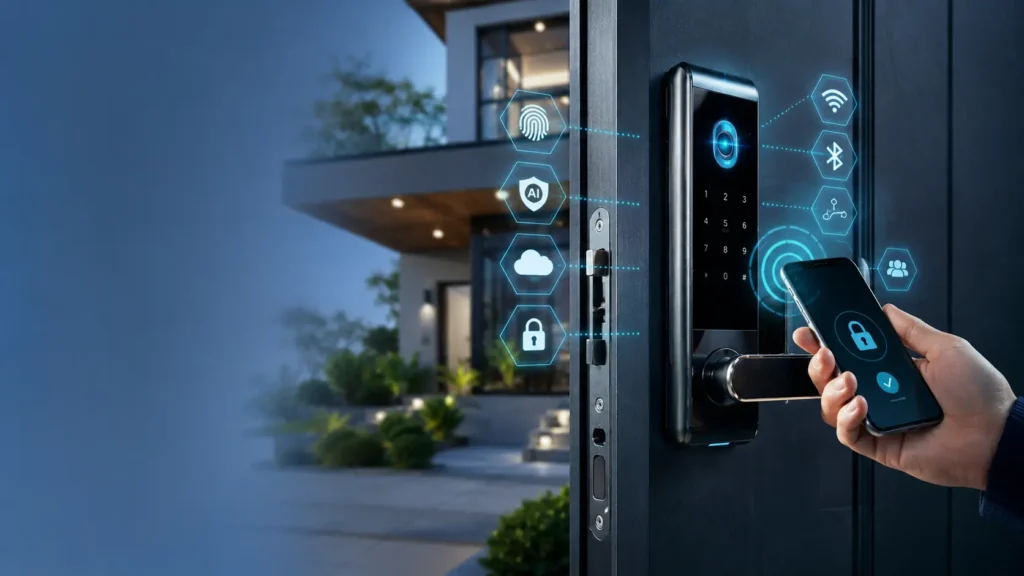
Smart locks replace or enhance a door’s traditional locking system with electronic access controls. Instead of relying only on a metal key, you may unlock the door with a PIN, smartphone, fingerprint, access card, digital home key, or voice-assisted automation.
The main benefit is not simply keyless entry. A well-chosen smart lock can create temporary guest codes, record access events, lock automatically, and warn you when the door is left unlocked.
However, a smart lock is not automatically safer than a high-quality mechanical lock. Its security depends on three separate factors:
- The physical strength of the lock, door, and frame.
- The security of its app, account, firmware, and wireless connection.
- Correct installation and responsible use.
This complete guide explains each factor without assuming that the most expensive or feature-rich lock is always the best choice.
What Is a Smart Lock?
A smart lock is an electromechanical locking device that authenticates approved users electronically. After successful authentication, a small motor or actuator retracts or extends the deadbolt, latch, or locking mechanism.
Depending on the model, authentication may happen through:
- A smartphone application
- A numerical PIN
- A fingerprint
- An NFC card or key fob
- Apple Home Key or another digital wallet credential
- Bluetooth proximity
- A wearable device
- A temporary digital key
- A traditional backup key
A basic electronic keypad lock is not always a true smart lock. Some keypad locks work entirely offline and cannot connect to an app, home network, or automation platform. They still provide keyless entry, but they lack remote management and connected features.
How Do Smart Locks Work?
Every smart lock combines mechanical hardware with an electronic control system.
1. The user presents a credential
The credential may be a PIN, fingerprint, phone, access card, digital key, or approved automation.
2. The lock verifies authorization
The lock checks whether the credential is valid. It may verify the credential locally, through a nearby hub, or with help from a cloud service.
3. The motor operates the lock
When access is approved, an internal motor turns the deadbolt or latch.
4. The event may be recorded
Connected locks can record the time, user, credential type, and lock status. Some models also send a notification to the owner.
5. Automations may run
The lock can trigger other smart home actions. For example, unlocking the front door may turn on an entry light or disarm a compatible security system.
The exact process depends on the lock’s communication method and smart home platform.
Main Types of Smart Locks
Smart locks are available in several physical designs. Choosing the correct design is more important than choosing the longest feature list.
Retrofit Smart Locks
A retrofit lock replaces only the interior thumb-turn portion of an existing deadbolt. The outside key cylinder and much of the original hardware remain in place.
Retrofit locks are useful when:
- You want to keep your current physical key.
- You rent and cannot alter the outside of the door.
- Your building has matching keyed locks.
- You want a less visible smart lock.
- You prefer a simpler installation.
The main disadvantage is that some retrofit units are bulky. They also depend on the condition and alignment of the existing deadbolt.
Full-Replacement Smart Deadbolts
A full-replacement model replaces the interior assembly, exterior cylinder, keypad, and deadbolt hardware.
These locks often provide more access methods, including:
- Keypad entry
- Fingerprint recognition
- Physical key backup
- App control
- Remote access
- Guest codes
They usually require more careful measurement and installation than retrofit models.
Smart Lever Locks
A smart lever lock combines an electronic latch with a door handle. It is common in offices, storage rooms, side doors, home offices, and interior doors.
A lever lock may not provide the same forced-entry resistance as a dedicated deadbolt. Therefore, check whether the product is intended for an exterior entry door.
Mortise Smart Locks
Mortise locks use a larger lock body installed inside a pocket cut into the edge of the door. They are common in hotels, commercial buildings, apartments, and some European or Asian homes.
Installation usually requires exact measurements. Replacing a mortise lock with an incompatible model can require door modification.
Multipoint and European-Cylinder Smart Locks
Many European doors use multipoint systems that secure the door at several points. Others use Euro-profile cylinders instead of standard North American deadbolts.
A lock made for a single-cylinder deadbolt may not fit these doors. Regional compatibility should always be confirmed before ordering.
Keypad Smart Locks
Keypad locks allow entry through a numerical code. Some are offline electronic locks, while others connect through Bluetooth, Wi-Fi, Zigbee, Z-Wave, or Thread.
Keypads are practical for children, cleaners, contractors, caregivers, and rental guests. They also remove the need for every user to install an app.
Fingerprint Smart Locks
Fingerprint locks use biometric authentication. They can be fast and convenient, especially when your hands are full.
However, fingerprint performance may decline when the sensor or finger is wet, dirty, cold, damaged, or poorly positioned. A fingerprint reader should not be the lock’s only access method.
Smart Lock Connection Types
The connection type affects battery life, range, remote control, hub requirements, and smart home compatibility.
Bluetooth Smart Locks
Bluetooth connects the lock directly to a nearby phone.
Advantages:
- Low power consumption
- Local operation without internet
- Simple setup
- Good battery efficiency
Limitations:
- Short operating range
- Remote access may require a bridge
- Automations may be limited without a hub
Bluetooth is often suitable for users who mainly want app-based local access.
Wi-Fi Smart Locks
A Wi-Fi lock connects directly to the home router or through a Wi-Fi bridge.
Advantages:
- Remote locking and unlocking
- Real-time notifications
- Access management from almost anywhere
- Broad smart home integration
Limitations:
- Higher battery consumption
- Greater dependence on network quality
- More accounts and cybersecurity responsibilities
Direct Wi-Fi can be convenient, but it is not always the most energy-efficient option.
Zigbee Smart Locks
Zigbee is a low-power mesh protocol. The lock normally connects to a compatible hub, which then connects to the home network.
Zigbee can provide efficient local communication, but buyers must verify that the lock, hub, and smart home platform support one another.
Z-Wave Smart Locks
Z-Wave is another low-power mesh technology commonly used in home security systems.
It usually requires a Z-Wave hub or compatible alarm panel. It can be a strong choice for an established security ecosystem, but regional radio frequencies differ. A Z-Wave lock purchased for one country may not work with a hub made for another.
Thread and Matter Smart Locks
Thread is a low-power IP-based mesh networking technology. Matter is a smart home interoperability standard that can operate over Thread or Wi-Fi, depending on the device type.
Matter aims to make certified products work across compatible ecosystems from companies such as Apple, Google, Amazon, and Samsung. However, a Matter logo does not guarantee that every manufacturer-specific feature will appear in every platform. Advanced settings may still require the lock maker’s app. The Connectivity Standards Alliance describes Matter as an IP-based standard designed to improve reliability, security, and interoperability.
Are Smart Locks Safe?
A good smart lock can provide strong security, but “smart” does not automatically mean secure.
Evaluate safety in three layers.
Physical Security
The lock should resist common forms of physical attack and daily wear.
In the United States, look for relevant ANSI/BHMA ratings. BHMA uses Grade 1, Grade 2, and Grade 3 performance levels, with Grade 1 representing the highest level. Tests may assess durability, strength, security, operation, and finish.
The grade should match the door’s purpose. A heavily used exterior door may need stronger hardware than a low-risk interior office.
Do not evaluate the lock alone. Also inspect:
- Door material
- Frame condition
- Strike plate
- Hinge screws
- Deadbolt alignment
- Glass beside the lock
- The gap between the door and the frame
A strong lock installed in a cracked frame still leaves a weak entry point.
Digital Security
Connected locks introduce risks that do not exist in purely mechanical locks. Weak passwords, abandoned apps, outdated firmware, exposed accounts, and insecure home networks can all reduce security.
Choose a manufacturer that provides:
- Encrypted communication
- Multi-factor authentication
- Signed firmware updates
- Security update information
- Login alerts
- Access-history controls
- A clear privacy policy
- A defined support period
- A reliable vulnerability-reporting process
NIST recommends unique passwords, multi-factor authentication, software updates, secure router settings, and careful privacy configuration for smart home devices.
Operational Security
Even a technically secure product can be used unsafely.
Common operational mistakes include:
- Sharing one permanent code with everyone
- Failing to remove old users
- Using an easy PIN such as 1234
- Enabling voice unlocking without extra authentication
- Ignoring low-battery warnings
- Leaving auto-unlock enabled without testing it
- Reusing the account password elsewhere
- Giving installers permanent administrator access
Use separate credentials for family members, cleaners, guests, and contractors. When possible, limit guest access by date, time, or number of uses.
Can Smart Locks Be Hacked?
Any connected device can contain vulnerabilities. However, a smart lock is not equally exposed under every configuration.
Attackers may target:
- The owner’s email account
- A reused app password
- An unprotected smartphone
- The home Wi-Fi router
- A poorly secured cloud account
- An outdated lock or hub
- A stolen digital credential
- A weak recovery process
Direct attacks against the lock’s wireless protocol are possible, but account takeover and poor configuration may be more realistic concerns for ordinary households.
Reduce risk by following these steps:
- Use a unique password for the lock account.
- Enable multi-factor authentication.
- Protect the connected email account.
- Install firmware and app updates.
- Secure the home router.
- Remove unused users and codes.
- Review the activity log.
- Avoid unknown or unsupported brands.
- Confirm how long the manufacturer provides updates.
- Keep at least one independent backup-entry method.
No lock is completely attack-proof. The goal is to remove easy opportunities and build several layers of protection.
Smart Lock Battery Life
Most residential smart locks use replaceable alkaline batteries or a rechargeable battery pack.
Real battery life depends on:
- Wireless protocol
- Motor size
- Door alignment
- Number of daily operations
- Temperature
- Wi-Fi signal strength
- Auto-lock frequency
- Fingerprint or touchscreen use
- Firmware behavior
- Battery chemistry
Locks with direct Wi-Fi generally use more power than Bluetooth or low-power mesh models. In current product testing reported by The Verge, built-in Wi-Fi locks commonly operated for about three to six months, while some Bluetooth models with optional bridges lasted roughly eight to twelve months. Actual results vary by device and conditions.
Why Door Alignment Affects Battery Life
A deadbolt should extend and retract without scraping or binding.
When the door shifts because of humidity, temperature, loose hinges, or frame movement, the motor must work harder. This can cause:
- Faster battery drain
- Jam warnings
- Incomplete locking
- Motor noise
- Failed auto-lock attempts
Before blaming the batteries or the app, test the lock with the door open. If it operates smoothly while open but struggles when closed, alignment is the likely problem.
What Happens When the Battery Dies?
The result depends on the model.
A smart lock may offer:
- Low-battery alerts
- A physical key cylinder
- External emergency power contacts
- A USB-C emergency power port
- A removable rechargeable pack
- Temporary power from a standard battery
- An interior manual thumb-turn
Learn the emergency procedure before the first battery warning appears.
Will a Smart Lock Work Without Wi-Fi?
Many smart locks continue to perform basic local functions without Wi-Fi.
Depending on the model, you may still be able to use:
- A PIN
- A fingerprint
- Bluetooth
- A physical key
- An NFC credential
- An interior thumb-turn
Features that may stop during an internet outage include:
- Remote unlocking
- Cloud notifications
- Remote code creation
- Voice assistant control
- Cloud-based activity history
- Some third-party automations
The lock’s mechanical operation should not depend entirely on an active internet connection. Confirm local functionality before buying.
Smart Lock Door Compatibility
Never assume that a smart lock fits every door.
Measure and verify the following.
Door Thickness
The mounting screws and tailpiece must support your door’s thickness.
Backset
Backset is the distance from the door edge to the center of the main bore hole. Common measurements vary by country and door type.
Bore-Hole Diameter
Replacement deadbolts require compatible holes. Older doors may use smaller or non-standard openings.
Deadbolt Type
Confirm whether the door uses:
- A single-cylinder deadbolt
- A double-cylinder deadbolt
- A rim lock
- A mortise lock
- A Euro cylinder
- A multipoint locking system
- An interconnected lockset
Door Handing
Some lever and mortise locks require left-handed or right-handed configuration.
Clearance
Check the available space around:
- Decorative trim
- Glass panels
- Storm doors
- Door frames
- Existing handles
- Interior blinds
Weather Exposure
The exterior assembly may have a weather-resistance rating, while the interior electronic unit does not.
A covered porch and an exposed coastal doorway create very different conditions. Check limits for rain, humidity, direct sun, dust, and temperature.
Smart Lock Installation Guide
Many standard deadbolt smart locks can be installed with a screwdriver. However, correct alignment matters more than speed.
Step 1: Confirm compatibility
Compare the door measurements with the manufacturer’s template.
Step 2: Test the existing door
Close and lock the door manually. The deadbolt should move without pushing, lifting, or pulling the door.
Step 3: Remove the old hardware
Keep the old lock and screws in a labeled bag, especially if you rent.
Step 4: Install the latch or deadbolt
Set the correct backset and keep the mechanism centered.
Step 5: Attach the exterior assembly
Protect cables from sharp edges and avoid twisting the tailpiece.
Step 6: Install the interior mounting plate
Keep it level. Tighten screws evenly without overtightening them.
Step 7: Connect the cable
Follow the manufacturer’s routing instructions so the cable does not contact moving parts.
Step 8: Install the interior unit and batteries
Make sure the bolt position matches the setup instructions.
Step 9: Run calibration
Many smart locks need to learn the locked and unlocked positions.
Step 10: Test every access method
Test the keypad, app, fingerprint reader, physical key, auto-lock, and emergency-power method.
Perform several tests with the door open before testing it while closed.
When to Hire a Professional
Professional installation is sensible when:
- The door needs drilling or cutting.
- You have a mortise or multipoint lock.
- The frame is damaged.
- The deadbolt does not align.
- The door is fire-rated.
- Building rules restrict hardware changes.
- The product warranty requires professional work.
- The lock controls a shared or commercial entrance.
Smart Lock Features That Actually Matter
A long feature list can distract from basic reliability.
Prioritize these features.
Multiple Entry Methods
Choose at least two independent access methods. A keypad plus physical key is often more resilient than app-only access.
Temporary and Scheduled Codes
Look for unique, time-limited codes rather than one shared household PIN.
Auto-Lock
Auto-lock helps when someone forgets to lock the door. A door-position sensor is better than a timer alone because a timer may extend the bolt while the door is still open.
Access History
An activity log helps identify who entered and whether the lock was operated manually or remotely.
Low-Battery Warnings
Useful alerts should appear early enough for battery replacement.
Local Operation
Basic entry should remain available during an internet outage.
Reliable Update Support
A smart lock may remain on the door for years. Long-term app and firmware support matters more than novelty features.
Smart Home Compatibility
Confirm the exact platform, hub, and feature support. “Works with” does not always mean every function is available.
Privacy Controls
Review what data the lock stores, where it stores it, and how long the company retains it.
Best Uses for Smart Locks
Families
Family members can receive separate codes, making it easier to see who arrived without distributing spare keys.
Rental Properties
Time-limited codes can replace physical key exchanges. However, owners should plan for internet outages, battery failure, and guests who are uncomfortable with apps.
Apartments and Renters
Retrofit locks can preserve the outside key cylinder and reduce permanent alterations. Tenants should still obtain permission where required.
Olders Users
A keypad, fob, or fingerprint can help users who struggle with small keys. The interface should remain simple, visible, and supported by an emergency backup.
Caregivers and Service Providers
Scheduled access allows a caregiver, cleaner, dog walker, or contractor to enter only during approved periods.
Home Offices and Interior Rooms
Smart lever locks can control access to offices, document rooms, equipment spaces, or supply closets.
Common Smart Lock Mistakes
Buying Before Measuring
A lock can be technically excellent and still be useless on an incompatible door.
Choosing Features Before Security
Start with door fit, lock strength, backup entry, and manufacturer support. Consider voice assistants and advanced automation afterward.
Ignoring the Strike Plate
The strike plate and frame are part of the security system.
Using One Shared Code
Separate codes improve accountability and make revocation easier.
Depending on One Entry Method
Phones can be lost, batteries can fail, and fingerprint sensors can misread.
Activating Auto-Unlock Without Testing
Test arrival detection from several directions and distances. Keep auto-unlock disabled when its behavior is unreliable.
Ignoring Firmware Updates
Updates can repair security, reliability, or battery-management problems.
Throwing Away the Original Lock
Renters and homeowners may need the original hardware later.
Smart Lock Maintenance Tips
Perform a simple check every few months.
- Clean the keypad and fingerprint sensor.
- Check battery condition.
- Inspect screws and mounting plates.
- Test the physical key.
- Review active users and codes.
- Remove expired guest access.
- Check the activity log.
- Install firmware updates.
- Test emergency power.
- Inspect door alignment.
- Confirm the lock works without internet.
- Verify that notifications still arrive.
Replace batteries before a long trip rather than waiting for a critical alert.
Smart Lock Buying Checklist
Before purchasing, answer these questions:
- What lock type is currently installed?
- Does the product fit the door thickness and backset?
- Is the hardware suitable for an exterior door?
- Does it have a recognized physical-security rating?
- Will it work during a Wi-Fi outage?
- Does it offer at least two access methods?
- Is there a physical key or emergency power option?
- Does it support unique and temporary codes?
- Does the manufacturer support multi-factor authentication?
- How are firmware updates delivered?
- How long is software support expected?
- Does it work with your current smart home platform?
- Does it require a separate hub or bridge?
- Are any useful features locked behind a subscription?
- Is the exterior unit suitable for local weather?
- Can every household member use it comfortably?
- Can you reinstall the original lock later?
- Is customer support available in your region?
Frequently Asked Questions
Are smart locks better than traditional locks?
Smart locks provide better access control, monitoring, and convenience. Traditional locks are simpler and do not require batteries, apps, or wireless connections. The better option depends on the hardware quality, installation, user habits, and need for connected features.
Do smart locks lock automatically?
Many do, but the feature may use a timer, geofencing, or a door-position sensor. A sensor-based system usually provides better awareness of whether the door is actually closed.
Can a locksmith open a smart lock?
A qualified locksmith may be able to service or bypass the mechanical portion. Support depends on the lock type, cylinder, brand, and local locksmith expertise.
Can I use a smart lock without a smartphone?
Yes, when the lock includes a keypad, fingerprint reader, key fob, access card, physical key, or another local credential.
What is the best smart lock connection?
There is no single best connection. Wi-Fi suits users who want direct remote access. Bluetooth suits simple local control: Zigbee and Z-Wave suit compatible hub-based systems. Thread and Matter can improve low-power connectivity and cross-platform integration.
Should a smart lock have a physical key?
A physical key provides a familiar backup, but it also adds a key cylinder that may be picked or attacked. Keyless models remove that cylinder but require a dependable emergency power and recovery method.
Are fingerprint smart locks reliable?
Good fingerprint readers can be fast, but performance varies with sensor quality and finger condition. Always keep another access method available.
Can landlords install smart locks?
Rules depend on the lease, local law, emergency-access requirements, and building policies. Renters should obtain permission before making permanent changes.
Are smart locks suitable for front doors?
Yes, provided the lock is rated for exterior use, fits the door, offers adequate physical security, and has reliable backup access.
Are smart locks worth it?
They are often worthwhile for households that regularly share access, manage guests, forget to lock doors, or want remote status monitoring. They may not be worthwhile for someone who prefers a simple mechanical system and does not need connected features.
Final Verdict
A smart lock should make access easier without creating a fragile point of failure.
The best model is not necessarily the one with the most unlocking methods. It is the lock that fits your door, operates smoothly, remains usable during outages, receives security updates, and gives every authorized user a dependable way to enter.
Start with physical compatibility and certified hardware. Next, examine cybersecurity, battery behavior, and backup access. Only then should you compare app design, voice assistants, biometrics, and automation.
A carefully selected smart lock can improve convenience, access control, and awareness. A poorly selected or badly installed model can create daily frustration. Treat it as both a door lock and an internet-connected security device.

I am Dr. Marcus Reed is an author and researcher focused on sustainable energy, environmental innovation, and clean technology. He is passionate about helping readers understand the future of renewable energy and eco-friendly solutions. Through his writing, he aims to simplify complex energy topics for a wider audience. Learn more at ecopowersence.com.