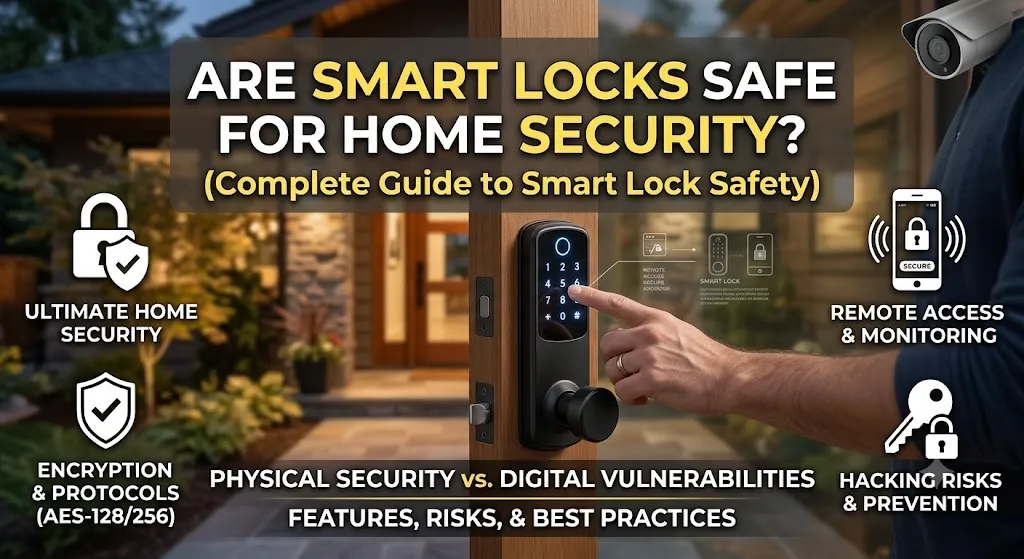
Introduction: Understanding Smart Lock Security Before You Upgrade Your Door
Home security technology is changing quickly. Traditional keys are no longer the only option for protecting homes. Smart locks now allow homeowners to use smartphones, PIN codes, fingerprints, and connected systems to manage access.
But one important question remains:
Are smart locks safe for home security?
Many homeowners hesitate before installing smart locks because they have concerns about hacking, internet failures, battery problems, and whether a digital lock can provide the same protection as a traditional lock.
These concerns are valid because smart locks combine two different areas of security:
- Physical protection of the door.
- Digital protection of connected technology.
A good smart lock can improve home security by offering better access control, activity monitoring, and remote management. However, no security device is completely risk-free. The safety level depends on the quality of the lock, installation method, software protection, and how users manage their accounts.
Smart locks are becoming an important part of modern connected homes. If you want to understand smart lock technology, features, and how these devices fit into a smart home system, explore our complete guide:
In this guide, we will explain how smart locks improve security, their possible weaknesses, and the practical steps you can take to make your smart lock safer.
How Smart Locks Improve Home Security
Smart locks provide more control than traditional locks because they allow homeowners to manage access digitally.
A traditional lock mainly depends on a physical key. If that key is lost, copied, or shared, controlling access becomes difficult.
Smart locks provide additional features such as:
- Digital access control.
- Temporary guest permissions.
- Smartphone unlocking.
- Activity tracking.
- Security notifications.
These features make smart locks useful for families, rental owners, and homeowners who want more control over their property.
Digital Access Control Instead of Physical Keys
One of the biggest advantages of smart locks is the ability to control who can enter your home without creating physical copies of keys.
Smart locks can provide access through:
- Mobile apps.
- PIN codes.
- Fingerprint recognition.
- Digital guest keys.
- Smart home automation systems.
For example, a homeowner can create a temporary access code for a cleaner or maintenance worker. Once the job is complete, that access can be removed without changing the entire lock.
This is much easier than traditional key management.
Digital access control is especially useful for:
Families
Each family member can have separate access instead of sharing one key.
Rental Properties
Owners can provide temporary access to guests without exchanging physical keys.
Shared Homes
Different users can have their own permissions.
Real-Time Monitoring and Security Alerts
Many smart locks offer monitoring features that traditional locks cannot provide.
Depending on the model, users may receive:
- Unlock notifications.
- Lock status updates.
- Access history.
- Failed entry alerts.
For example, parents can receive a notification when children arrive home, or homeowners can check whether the door was locked after leaving.
These features do not replace a complete security system, but they provide better awareness of what is happening at the entrance of a home.
Are Smart Locks Safer Than Traditional Locks?
The answer depends on what type of security you are comparing.
Traditional locks are simple and reliable, while smart locks add digital features and remote control.
A smart lock is not automatically safer just because it is more advanced. Security depends on the quality of the product, installation, and user practices.
Smart Locks vs Traditional Locks Comparison
| Feature | Traditional Lock | Smart Lock |
|---|---|---|
| Access method | Physical key | App, PIN, fingerprint, or key |
| Remote control | Not available | Available on connected models |
| User management | Requires extra keys | Digital permissions |
| Activity tracking | Usually unavailable | Available on many models |
| Temporary access | Requires key sharing | Digital access codes |
| Power source | No battery needed | Requires batteries |
Advantages of Smart Locks
Smart locks offer several benefits compared with traditional locks.
Better Access Management
Homeowners can add or remove users without changing the entire locking system.
Remote Control
Connected smart locks allow users to manage access while away from home.
Activity Awareness
Some models record access history, helping homeowners understand who entered and when.
Convenient Keyless Entry
Users can unlock doors without searching for physical keys.
Where Traditional Locks Still Have Advantages
Traditional locks still have some benefits.
No Internet Connection
A traditional lock does not depend on Wi-Fi or cloud services.
No Battery Issues
A traditional lock continues working without batteries.
Simple Operation
Some users prefer systems with fewer electronic components.
However, traditional locks also have limitations. Lost keys, copied keys, and lack of access history can create security challenges.
Can Smart Locks Be Hacked?
One of the biggest concerns people have is whether hackers can access smart locks.
The reality is that any connected device can face cybersecurity risks. Smart locks are no different.
However, the actual risk depends on:
- Lock design.
- Security features.
- Software updates.
- User habits.
- Network protection.
A quality smart lock with proper security settings can provide strong protection.
Common Digital Security Risks
Weak Passwords
A weak password can create security problems for any connected device.
Users should avoid:
- Simple passwords.
- Shared account details.
- Reusing passwords from other websites.
A strong password is one of the easiest ways to improve smart lock security.
Outdated Software
Smart locks use firmware and software to operate.
Manufacturers release updates to improve:
- Security.
- Performance.
- Compatibility.
Ignoring updates may leave devices exposed to known security issues.
Unsafe Home Networks
Wi-Fi smart locks depend on the security of the home network.
Homeowners should:
- Use strong Wi-Fi passwords.
- Update router software.
- Remove unknown connected devices.
The National Institute of Standards and Technology (NIST) Cybersecurity for IoT Program provides guidance for improving security practices for connected devices.
How Manufacturers Protect Smart Locks
Smart lock manufacturers understand that security is the most important factor for connected home devices. Modern smart locks use several protection methods to reduce unauthorized access and protect user information.
A secure smart lock combines physical hardware protection with digital security features.
Encryption and Secure Communication
Encryption helps protect information exchanged between devices.
For example, when a smartphone sends an unlock command to a smart lock, encryption helps prevent unauthorized people from reading or changing that communication.
Smart locks may use encryption between:
- Mobile applications.
- Smart lock hardware.
- Cloud services.
- Smart home platforms.
However, encryption is only one part of security. Users must also protect their accounts, update software, and maintain secure home networks.
User Authentication and Access Control
Authentication confirms whether a person has permission to unlock a door.
Smart locks may verify users through:
- Passwords.
- PIN codes.
- Fingerprints.
- Smartphone authentication.
- Digital access permissions.
This gives homeowners more control compared with traditional keys.
For example, if someone no longer needs access, their digital permission can be removed instantly without replacing the entire lock.
Firmware Updates and Security Improvements
Like smartphones and computers, smart locks use software that requires updates.
Firmware updates can improve:
- Security protection.
- Device performance.
- Compatibility with new technologies.
Choosing a smart lock from a manufacturer that provides regular updates is an important part of long-term security.
Physical Security Risks of Smart Locks
When discussing are smart locks safe for home security, many people focus only on hacking risks.
However, physical security is equally important.
A smart lock is still attached to a physical door. The strength of the door, installation quality, and lock design directly affect overall protection.
The Importance of Door and Lock Quality
A smart lock cannot fully protect a weak door.
Important physical security factors include:
Strong Door Construction
A strong door provides a better foundation for any locking system.
Quality Deadbolt and Lock Components
The internal locking mechanism should be durable and designed for security.
Correct Installation
Poor installation can reduce the effectiveness of even a high-quality smart lock.
Common installation problems include:
- Incorrect alignment.
- Loose mounting.
- Poor fitting.
Why Smart Technology Alone Is Not Enough
Smart locks should be considered one part of a complete home security strategy.
A secure home may also include:
- Strong doors.
- Window protection.
- Security cameras.
- Outdoor lighting.
- Alarm systems.
Technology works best when combined with good physical security practices.
Are Wi-Fi Smart Locks Safe?
Wi-Fi smart locks are popular because they offer advanced features such as remote access and smart home integration.
However, because they connect to the internet, many homeowners wonder whether Wi-Fi creates additional security risks.
Benefits of Wi-Fi Smart Locks
Remote Access
Wi-Fi allows homeowners to control their locks from almost anywhere.
Examples:
- Unlocking the door for family members while away.
- Giving temporary access to guests.
- Checking door status during travel.
Smart Home Integration
Wi-Fi smart locks can connect with other smart devices.
Examples:
- Unlocking the door can turn on indoor lights.
- Locking the door can activate a security routine.
Real-Time Notifications
Users may receive alerts about:
- Door activity.
- Failed access attempts.
- Battery status.
Wi-Fi Security Concerns
Wi-Fi smart locks depend on both the lock’s security and the protection of the home network.
Weak Router Security
A poorly protected router can create risks for connected devices.
Homeowners should:
- Use strong Wi-Fi passwords.
- Update router firmware.
- Avoid unknown devices connected to the network.
Internet Dependency
If the internet connection fails, some remote features may stop working.
However, many smart locks still support local access methods such as:
- Keypad entry.
- Fingerprint unlocking.
- Bluetooth access.
- Physical key backup.
Are Bluetooth, Keypad, and Fingerprint Smart Locks Secure?
Different smart lock technologies provide different security advantages.
The safest option depends on how the lock will be used.
Bluetooth Smart Lock Safety
Bluetooth smart locks connect directly with nearby smartphones.
They are designed mainly for local access rather than controlling a door from another location.
Advantages of Bluetooth Locks
- Lower energy consumption.
- Works without internet.
- Simple connection process.
- Good for nearby smartphone unlocking.
Security Considerations
Bluetooth locks are useful for users who do not need remote access.
They are often suitable for:
- Apartments.
- Small homes.
- Users who mainly unlock their own doors.
Keypad Smart Lock Security
Keypad smart locks use PIN codes instead of physical keys.
They are popular because they provide easy access for multiple users.
Advantages of Keypad Locks
- No need to carry keys.
- Easy guest access.
- Multiple user codes.
- Temporary access options.
Security Considerations
Users should follow good practices:
- Avoid simple PIN codes.
- Do not share codes unnecessarily.
- Remove old user access.
- Change codes when needed.
A keypad lock can be secure when access codes are managed properly.
Fingerprint Smart Lock Security
Fingerprint smart locks use biometric authentication to identify approved users.
Instead of entering a password or carrying a key, users simply place their finger on a sensor.
Advantages of Fingerprint Locks
Fast Access
Users can unlock doors quickly without searching for keys or remembering codes.
Personalized Entry
Each approved user can have their own fingerprint profile.
Convenient Daily Use
Fingerprint access works well for:
- Families.
- Personal homes.
- Shared spaces.
Limitations of Fingerprint Locks
Fingerprint systems may sometimes experience problems because of:
- Dirty sensors.
- Wet fingers.
- Poor fingerprint registration.
Keeping the sensor clean and maintaining backup access methods improves reliability.
How to Make Your Smart Lock More Secure
Buying a quality smart lock is only the first step. Proper setup and user habits also affect security.
Use Strong Account Protection
Homeowners should:
- Create strong passwords.
- Avoid sharing login information.
- Enable two-factor authentication if available.
Keep Software Updated
Regular updates help improve:
- Security.
- Performance.
- Reliability.
Ignoring updates can reduce the protection of connected devices.
Secure Your Home Network
For Wi-Fi smart locks:
- Protect your router.
- Use strong Wi-Fi passwords.
- Update network equipment regularly.
The Cybersecurity and Infrastructure Security Agency (CISA) IoT Security Resources provides guidance for protecting connected devices and improving IoT security practices.
How to Choose a Secure Smart Lock
Choosing the right smart lock is an important step in improving home security. Not every smart lock offers the same level of protection, and the most expensive option is not always the best choice.
A secure smart lock should match your lifestyle, door type, security requirements, and comfort level with technology.
Before buying, focus on important factors such as product quality, security features, backup options, and manufacturer support.
Choose a Trusted Smart Lock Brand
A reliable manufacturer is more likely to provide:
- Regular security updates.
- Better product testing.
- Strong customer support.
- Improved hardware quality.
Before purchasing a smart lock, check:
- Customer reviews.
- Security features.
- Update history.
- Compatibility with your door.
A smart lock is a long-term security device, so choosing a trusted product matters.
Check Security Standards and Protection Features
Smart locks are connected devices, which means cybersecurity should be considered before installation.
Look for features such as:
- Strong encryption.
- Secure authentication.
- Firmware updates.
- User access management.
- Activity monitoring.
Organizations such as the National Institute of Standards and Technology IoT Device Security Guidance provide recommendations for improving security practices for connected devices.
Following recognized security practices helps reduce risks and improves the reliability of smart home technology.
Consider Backup Access Options
A secure smart lock should provide alternative access methods in case technology fails.
Useful backup options include:
- Physical key access.
- Emergency battery charging.
- External power connection.
- Alternative authentication methods.
Backup access is important because problems can happen due to:
- Dead batteries.
- Smartphone issues.
- Internet outages.
- Connection problems.
Understanding your lock’s backup system before installation can prevent stressful situations later.
Smart Lock Security Checklist Before Buying
Before choosing a smart lock, ask these important questions.
Does the Lock Have Strong Authentication?
A good smart lock should support secure access methods such as:
- Strong PIN codes.
- Fingerprint recognition.
- Smartphone authentication.
- User permission controls.
These features help ensure that only approved people can access your home.
Does It Provide Activity Monitoring?
Security becomes easier to manage when you know what is happening at your door.
Useful monitoring features include:
- Entry history.
- Unlock notifications.
- Failed access alerts.
- Door status updates.
These features provide more awareness compared with traditional locks.
Does the Manufacturer Provide Updates?
Smart locks depend on software, so ongoing updates are important.
Choose products that receive updates to improve:
- Security.
- Performance.
- Compatibility.
A device without regular support may become less secure over time.
Does It Work With Your Smart Home System?
Many homeowners want smart locks to connect with other devices.
Compatibility may include:
- Smart home hubs.
- Voice assistants.
- Security systems.
- Automation platforms.
The Connectivity Standards Alliance Matter Smart Home Standard explains how modern smart home devices can communicate more easily across different platforms.
Common Smart Lock Security Questions
What Happens If a Smart Lock Battery Dies?
A dead battery does not always mean you are locked out.
Many smart locks provide backup solutions, including:
- Emergency charging ports.
- Physical keys.
- External battery connections.
However, homeowners should understand the emergency method before installing the lock.
Regular battery checks and low-power alerts help prevent unexpected problems.
Can Someone Unlock My Smart Lock Remotely?
Remote access is designed for authorized users, but security depends on proper setup.
To reduce risks:
- Use strong passwords.
- Protect your smartphone.
- Keep software updated.
- Secure your Wi-Fi network.
- Avoid sharing access details unnecessarily.
A well-designed smart lock with proper security settings can provide reliable protection.
Are Fingerprint Smart Locks Safer Than Keypad Locks?
Both fingerprint and keypad smart locks have advantages.
Fingerprint locks provide:
- Fast access.
- Personal authentication.
- No need to remember codes.
Keypad locks provide:
- Easy guest access.
- Multiple user codes.
- Simple management.
The better choice depends on your situation.
For example:
- Families may prefer keypad locks for flexible access.
- Individuals may prefer fingerprint locks for quick daily entry.
Do Smart Locks Work Without Wi-Fi?
Yes, many smart locks can work without Wi-Fi.
Features that may continue working include:
- Fingerprint unlocking.
- Keypad entry.
- Bluetooth access.
- Physical key backup.
Wi-Fi is mainly needed for advanced features such as:
- Remote unlocking.
- Cloud services.
- Internet-based notifications.
Should I Replace My Traditional Lock With a Smart Lock?
Replacing a traditional lock with a smart lock can be a good decision if you want:
- Keyless entry.
- Better access control.
- Remote management.
- Smart home integration.
However, the decision depends on your personal needs.
Ask yourself:
- Do I need remote access?
- Will multiple people use the door?
- Do I want access tracking?
- Am I comfortable managing connected technology?
For many homeowners, smart locks provide a useful balance between convenience and security.
Final Verdict: Are Smart Locks Safe for Home Security?
So, are smart locks safe for home security?
Yes, smart locks can be a safe and effective security upgrade when they are properly selected, installed, and maintained.
They provide several advantages over traditional locks, including:
- Digital access management.
- Temporary user permissions.
- Activity monitoring.
- Remote control.
- Smart home integration.
However, smart locks are not a complete security solution by themselves. A strong door, quality installation, secure network, software updates, and responsible account management are all important parts of protecting your home.
The best smart lock is not necessarily the one with the most features. It is the one that matches your lifestyle and provides the right combination of convenience and protection.
If you are planning a smart home upgrade, understanding how smart locks work is the first step. A properly chosen smart lock can make daily access easier while giving homeowners better control over who enters their home and when. For a complete understanding of smart lock technology, features, installation, and buying considerations, explore our detailed guide:

I am Dr. Marcus Reed is an author and researcher focused on sustainable energy, environmental innovation, and clean technology. He is passionate about helping readers understand the future of renewable energy and eco-friendly solutions. Through his writing, he aims to simplify complex energy topics for a wider audience. Learn more at ecopowersence.com.